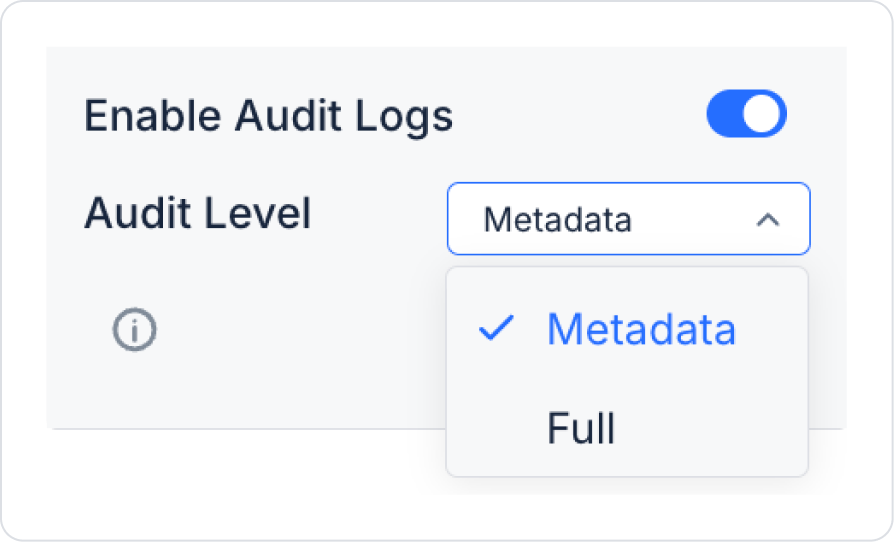
Kuika's Audit Log feature allows user and system actions to be logged only for actions and configuration fields that support audit logs. This feature is not enabled by default for all actions; it can only be enabled for actions that are critical to audit and compatible with audit logs.
Audit Log settings are managed through the relevant action or configuration.
Audit Log Levels
In actions that support Audit Log, the level of detail of the data to be recorded is determined via the Audit Level field.
Metadata
Information about who performed the action, when, and which action was performed is recorded.
Old and new values are not stored on a field basis.
Provides lower log volume and performance advantages.
Suitable for general monitoring and basic auditing needs.
Full
In addition to metadata information:
Old and new values on a field basis
Changed parameters
Detailed transaction content
Preferred for financial and critical business processes.
Provides higher traceability.
Enable Audit Log Usage
1. Open the Action Supporting Audit Log
The Audit Log feature is only visible in supported actions. In unsupported actions, the Enable Audit Log option does not appear in the Properties panel.
2. Open the Properties Panel
After selecting the relevant action, go to the Properties panel on the right.
3. Activate Enable Audit Log
Set the Enable Audit Logs switch to the ON position.
Audit Log is enabled for this action.
4. Select Audit Level
Set the level to Metadata or Full as needed.
The selected level directly affects the details of the audit log to be recorded.
Important Notes
Enable Audit Log does not apply to all actions.
It can only be used for actions that support the audit log infrastructure.
It is recommended for critical, financial, or permission-based transactions.
The Full audit log level should be used considering performance and log volume, as it generates more data and records.
Advantages of Using Audit Log
Controlled Monitoring: Only necessary actions are included in the audit log scope.
Security: Critical transactions can be monitored in detail.
Compliance: Audit and regulatory requirements are supported.
Flexibility: Action-based audit log configuration is possible.