Update User Access Delegation Action Application Steps
Open your project in Kuika.
Select the relevant screen from the UI Design module.
Add a button named “Update Permissions.”
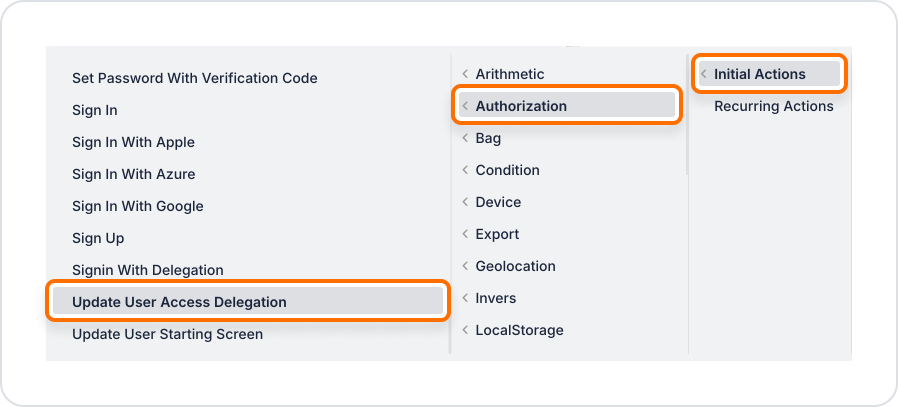
Add the + ADD ACTION > Authorization > Update User Access Delegation action to this button click event.
Via Symbol Picker:
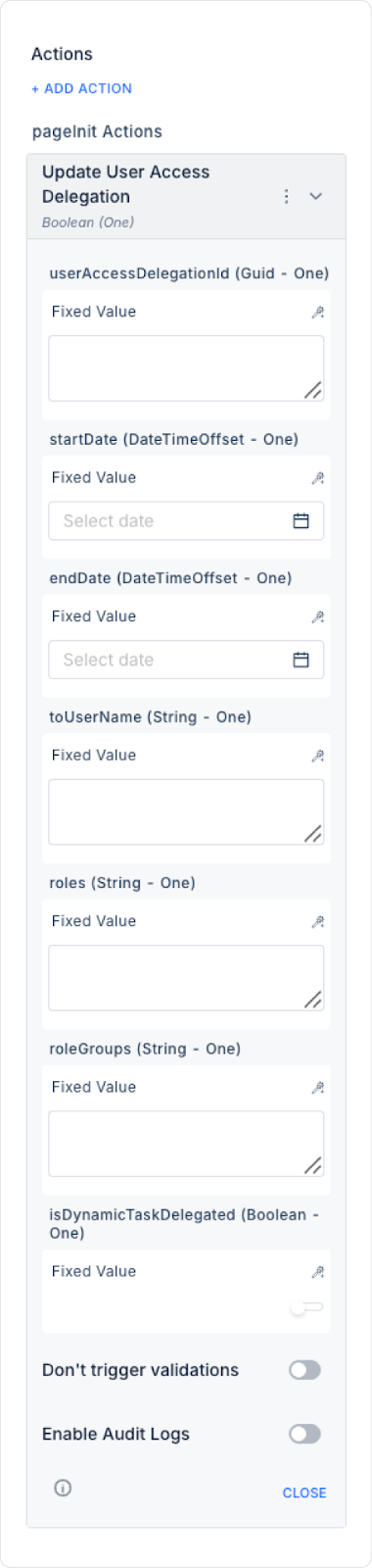
UserAccessDelegationId (String - required): The ID of the delegation record to be updated in the system.
StartDate (DateTime - required): The new start date of the delegation.
EndDate (DateTime - required): The new end date of the delegation.
ToUserName (String - required): The email address of the new user to whom the permission will be delegated.
Roles (String - required): Updated role list. Multiple roles can be specified.
Role Groups: Specifies the role groups to be delegated. When role groups are defined, all roles associated with these groups are automatically included in the delegation.
Is Dynamic Task Delegated: When enabled, dynamic tasks created during the delegation period are also delegated to the new user. When disabled, only tasks existing at the time of the update are included.
Enable Audit Log: When enabled, the user permission delegation update is added to the audit log records. This allows tracking which record, which fields, when, and by which user the delegation was updated.