Smart Templates Powered by AI

After creating an AI Action, you can quickly perform your tasks using the pre-built templates on the screen that opens:

  • Speech To Text English: Convert spoken English to text.
  • Taxi Receipt: Read and process taxi receipts.
  • Sensitive Content: Detect sensitive content.
  • Receipt Reader Multiple: Reading different types of receipts.
  • Capture Image From Camera: Taking a photo with the device’s camera.
  • Detect Object Count From Image: Counting objects in an image.
  • Split Image: Splitting an image into parts.
  • Fashion Labeling: Labeling fashion products.
  • Analyze Security Camera Footage: Analyzing security camera footage.
  • Custom: Can be configured to meet specific needs.
  • CV Reader: Reading and interpreting information from resumes.
  • Create Image: AI-powered image generation.
  • Text to Speech: Converting written text into spoken speech.
  • Speech to Text: Transcribing speech into text.
  • Grammar Corrector: Correcting grammar errors.
  • Sentiment Analysis: Analyzing the emotional tone in text.
  • Text Summary: Summarizing long texts.
  • Text Extractor: Extracting text from images or PDFs.
  • Image Analyzer: Analyzing images to provide information about their content.
  • Article Writer: Creating articles on specific topics.
  • Brand Generator: Generating brand names or concept suggestions.
  • Exam Creator: Designing exam questions and answers.
  • Survey Creator: Creating surveys.
  • Text Translator: Translating text into different languages.
  • PDF Translator: Translating PDF files into different languages.
  • Receipt Reader: Reading and analyzing information on receipts.
  • Edit Image: Editing, correcting, or applying visual effects to uploaded images.
  • Generate Video: Create AI-powered video content from text, images, or templates.
  • Product Description Generator: Automatically generates product descriptions tailored to the target audience.
  • Customer Feedback Analyzer: Analyzes customer feedback to identify trends and issues.
  • Executive Summary Generator: Summarizes long reports or documents for executives.
  • Refund Policy Explainer: Simplifies and explains refund policies in a user-friendly manner.
  • Meeting Availability Summarizer: Summarizes meeting dates and availability information.
  • Emotional Tone Detector: Detects the emotional tone in text.
  • Table Data Cleaner: Cleans and formats errors in table data.
  • Gift Recommender: Provides gift recommendations based on recipient characteristics.
  • Conflict Resolution Advisor: Offers constructive solutions in conflict situations.
  • Legal Clause Simplifier: Simplifies legal texts.
  • Code Bug Explainer: Analyzes faulty code segments and explains the cause of the issue.
  • Visual Prompt Booster: Enhances prompts for creating visuals.
  • Persona Tone Styler: Provides tone suggestions tailored to the target persona.
  • Text Tag Suggester: Suggests appropriate tags for text.
  • Auto Section Namer: Generates appropriate headings for content sections.
  • User Feedback Categorizer: Categorizes user feedback.
  • Question Rephraser: Rewrites questions in a clearer and more effective manner.
  • Content Expander: Expands short texts into detailed versions.
  • Performance Review Interpreter: Interprets performance review texts.
  • Intent Classifier: Classifies user intent.
  • Symptom to Prediagnosis: Analyzes symptoms to provide a preliminary diagnosis.
  • Policy Document Simplifier: Simplifies policy documents.
  • Financial Briefing Generator: Generates financial report summaries.
  • Text Summarizer: Summarizes long texts concisely and meaningfully.
  • Task Brief to Checklist: Converts task descriptions into to-do lists.
  • Tone Analyzer and Suggester: Analyzes the tone of the text and offers suggestions for improvement.
  • Knowledge Base Answer Generator: Generates appropriate responses from the knowledge base.
  • Instruction Generator: Creates step-by-step instructions.
  • Form Auto Filler: Automatically fills out form fields based on content analysis.
  • Product Review Analyzer: Analyzes product reviews and generates summaries.
  • Blog Post Outline Creator: Generates title and subheading suggestions for blog posts.
  • Resume Bullet Point Optimizer: Professionally optimizes bullet points in resumes.
  • Data Insight Summary Generator: Generates short summaries from data analyses.
  • Competitor Analysis Summary: Summarizes competitor analyses.
  • Social Post Sentiment Forecaster: Predicts the emotional impact of social media posts.
  • Feature Priority Ranker: Ranks product features by importance.
  • Code Complexity Analyzer: Measures code complexity and offers simplification suggestions.
  • Sustainability Action Advisor: Generates sustainability-focused strategy recommendations.
  • Event Marketing Idea Generator: Generates creative ideas for event marketing campaigns.
  • Code Optimization Advisor: Provides recommendations to improve code performance.
  • Brand Voice Translator: Adapts content to align with the brand’s tone of voice.
  • Product Bundle Suggester: Suggests product combinations that can be sold together.
  • Investment Portfolio Advisor: Provides analysis and recommendations for investment portfolios.
  • SEO Product Description Generator:Generates SEO-optimized product descriptions.
  • Task Checklist Generator: Converts task descriptions into actionable checklists.
  • Pharmacode Scanner: Reads medication barcodes in images and decodes Pharmacode values.
  • Inspect Box and Hologram: Detects GTIN/Serial/Expiration Date/Lot information and the security hologram from boxes.
  • Inspect Blister Front Face: Detects the number of tablets, their color, shape, and any damage on the blister pack.
  • Inspect Blister Expiry: Reads the expiration date on the blister pack.
  • Inspect Blister Back Face: Compares the production blister back face to a reference design.

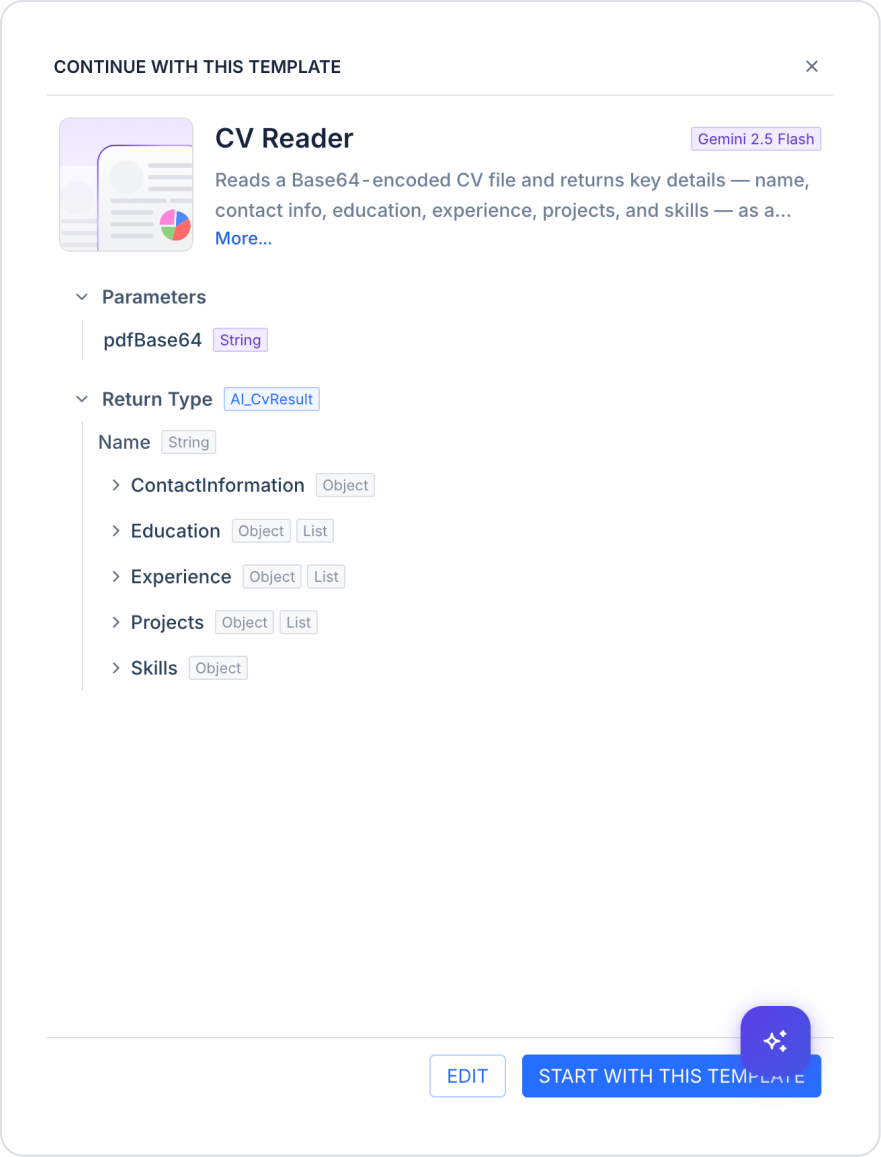
When you click the “View Detail” field in a template, a preview window titled “Continue With This Template” opens. In this window, you can view the AI model used by the template, a brief description, Parameters (input parameters and data types), and Return Type (output data structure and fields).

  • You can customize the template using the EDIT button to proceed to the editing screen.
  • You can start using the template as is by clicking the “START WITH THIS TEMPLATE” button.

For example, in the CV Reader template:

  • Parameter: pdfBase64 (String) — The CV file is passed in Base64 format.
  • Return Type: AI_CvResult — Returns a structured output consisting of the following fields: Name (String), ContactInformation (Object), Education (Object, List), Experience (Object, List), Projects (Object, List), and Skills (Object).