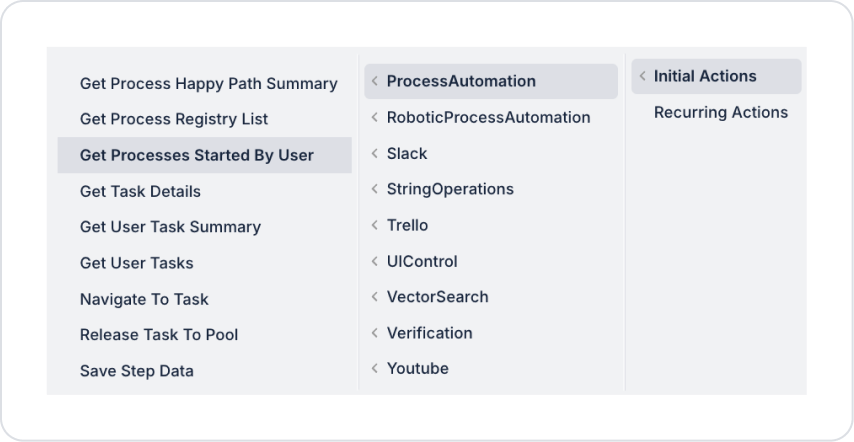
Kuika's Get Processes Started By User action is used to list processes initiated by the user. This allows users to easily track the workflows they have started and view the current status of the processes.
Technical Specifications
User-Based Listing: Only retrieves processes initiated by that user.
Status Tracking: Active, ongoing, or completed processes can be filtered.
Web and Mobile Application Support: This action is supported in both web and mobile applications.
Get Processes Started By User Action Application Steps
Log in to the Kuika platform.
Open the project you will be working on from the Apps screen.
While in the UI Design module, open the Properties panel on the right side.
From the + ADD ACTION menu, add the Process Automation > Get Processes Started By User action according to the trigger event you want (Initial Actions, OnClick, OnBlur, etc.).
Configuring Action Parameters
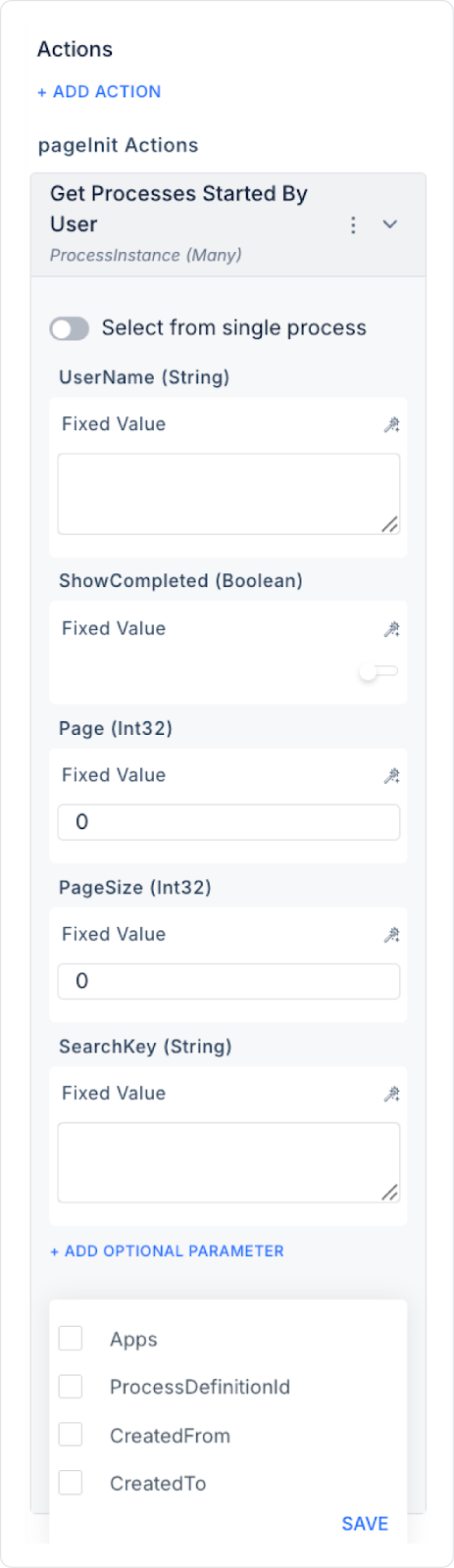
Select From Single Process: When enabled, the query is performed only on the selected single process. When disabled, data can be returned from multiple processes.
Show Completed (Boolean):
If active, processes started and completed by the user are also listed.
If disabled, only active and ongoing processes are displayed.
Page (Integer): Determines the starting number of the listing page. Used for pagination when there are many processes.
Page Size (Integer): Determines how many processes will be displayed on each page.
Search Key (String): Enables searching process titles or content.
+Add Optional Parameter
Apps (String - optional): Allows querying processes within a specific application.
Process Definition ID: Used to filter process instances belonging to a specific process definition.
Created From: Lists processes created after the specified date and time.
Created To: Lists processes created up to the specified date and time.
Enable Audit Log: When enabled, user and transaction information related to the execution of this action is added to the audit log records.
Usage Scenario: Monitoring Processes Started by the User
An employee can track the status of processes they have previously started to see which workflows have been completed or are still ongoing. This simplifies their own process management and speeds up process tracking.
Example of Configuring the Get Processes Started By User Action
Show Completed: true (Also list completed processes)
Page: 1 (Start from the first page)
Page Size: 20 (Show 20 processes per page)
Search Key: “Report” (Retrieve processes containing “Report” in the title or content)
Apps: “FinanceApp” (Only list processes in the FinanceApp application)
Get Process Started By User Action Advanced Customizations
Dynamic Search: The Search Key can be dynamically set according to user input.
Pagination Control: Users can easily navigate between list pages.
Application-Based Filter: In multi-application management, processes can be separated and detailed by application.
Technical Risks
Incorrect Parameter Usage: Incorrect settings for Show Completed, Page, or Page Size values may affect listing results.
Performance with Large Data Sets: Paging performance may be critical when there are too many processes.
The Get Processes Started By User action enables effective tracking of processes initiated by the user on the Kuika platform, allowing for transparent and efficient management of workflows.